Friday, December 30, 2011

Boost youtube performance in Firefox and other browsers

Watching youtube videos without buffering is a great need because every youtube lover wants it.Is your Browser too slow that it plays youtube videos as slow as a turtle???. Sometimes I get frustrated by the pauses that it takes after each 3 seconds. Sometimes this makes me bang my computer. It is a big headache for the youtube lovers. But I found the solution for this. However,this trick it will enhance your youtube video's speed to a convenient way and make your entertainment while watching videos more reliable!!!


Steps to Improve your youtube Performance in Firefox:-

  1. Open Firefox and in the address bar, type "about:config" and hit enter.
  2. It will show you a warning message. Just ignore it and click on I'll be careful, I promise.
  3. Then in the filter text entry bar, type "browser.sessionstore.intervalyou will see something like  below.
Improve youtube performance in Firefox

     Just Double click on it and change its value to 120000.
        Improve youtube performance in Firefox

Software to Boost youtube performance in all other browsers:-

There is a software know as Speedbit Video Accelerator. It ill help you to eliminate buffering and help you enjoy watching videos. It will work for all browsers like Firefox and Chrome.


 DOWNLOAD HERE
Also make sure that you are using the latest version of Adobe flash Player.

So, I hope you have enjoyed my article!!!
Kindly share your views....

continue reading

SpeedyFox: Firefox Speed Booster


SpeedyFox: Firefox Speed Booster
Hey friends....I hope you all are fine. Are you are pissed off with the slow Firefox speed??? Then Today am going to provide you a very useful tool for you that is SpeedyFox, which will help you to get rid of slow Firefox Speed. SpeedyFox is a small utility which compresses all your saved data and thereby, enhances your Firefox speed to a great way.  It compresses all the data that makes Firefox heavier and eats up its speed. It will compress it and will make it faster and smoother.


Features of Speedyfox:-


  • It will boost your startup time by 3 times
  • Boost your browsing speed.
  • Quick Operation with Cookies
SPEEDYFOX FREE DOWNLOAD FOR WINDOWS
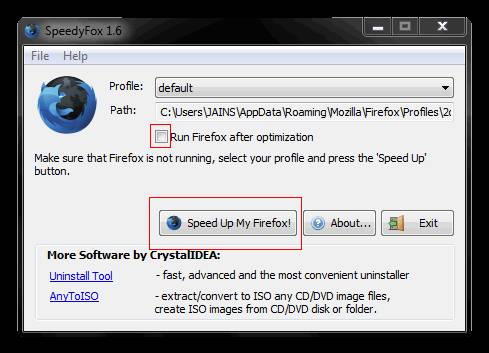
  1. After Downloading SpeedyFox, Just run it.
  2. Check mark on Run Firefox After Optimization.After that
  3.  Click on Speed up my Firefox. {Make sure that Firefox is closed}
SpeedyFox: Firefox Speed Booster


When it will be optimized, the Firefox window will open and you will see a Sudden increase in your Browsing Speed!!Enjoy!!!!!
So, I hope my article was useful to you!!
Please do comments on this post!!
Keep Visiting!!!

continue reading

Best Answers to What is Your Greatest Strength


Good Listener

My strength is that I am good at listening to people who have problems. I can counsel them to find solutions for themselves. I have strong confidence in my judgment.
—Guest Ent Seng

Not Getting Distracted

I am optimistic and my strength is that I won't get distracted easily during working hours, and I finish my projects earlier than the allotted time.
—Guest saranya

Inner Strengths

I'm quick learner, optimistic, and hardworking. I have the patience to control my anger.
—Guest sonu sharma

Hardwork

My greatest strength is the hardwork I do to give my best effort to achieve positive results.
—Guest Nithya

Adaptability

My greatest strength is adaptability... If one can adapt oneself to a particular situation or an environment in a positive way, he/she will always be a winner.
—Guest Alok

This, too, shall pass

My greatest strength is that I can thrive under pressure, being patient and optimistic because I know that everything is happening for a reason and it's going to pass.
—Guest razel

Communication

A Strong emphasis on maintaining open communication across the board in all environments and situations .
—Guest Lena

influencing power

My greatest strength... I don't have to make an effort to impress people. They get impressed by me anyway!!!!!
—Guest darshana

Concentrated Effort

I can work with concentration and can devote my entire energy and time to the task assigned to me.
—Guest lilly

Not a Problem, but an Opportunity

I see challenging situation not as a problem, but rather as an opportunity to learn sometime new. This keeps me focused and motivated to stick to the task no matter how difficult, and get it done. And I feel a great sense of accomplishment when this happens.
—Guest Hippolytus Oluoha

Diverse Talents

I have excellent interpersonal skills. I enjoy interacting with people, listening to their problems or issues. This challenges me me when it comes to problem solving and decision making, and I also learn from them. I take challenges in a positive manner instead of viewing them as a hindrance to doing a good job. I make an action plans for every issue. I'm a competitive person, and I always wanted to be at my best. Even if I lose in the end, i will still be proud because i know that I was in a close fight.
—Guest Mae Kristine

My Greatest Strength

Is my willingness to learn and practice new things every day, so that I can keep my confidence and be better at the things that I face and do everyday.
—Guest Maria

Results-Focused

My greatest strength is my willingness to give my best effort to achieve positive results.
—Guest maria joy

my patience

i think it is my patience, it is a great virtue in one's character for we are in the environment with different people with different personality and patience will be definitely helps in dealing with...
—Guest ronald

Concentration

I can work with concentration and can devote my entire energy and time to the task assigned to me.
—Guest technocrat

My greatest strength

My greatest strength is being a positive thinker, and I face all the challenges in my job with confidence..
—Guest chum

Consistency and Integrity

My greatest strengths are consistency and integrity with my work.
—Guest NASIR KHAN

My greatest strength?

My greatest strength is that I have a great knowledge about customer relationships and I have learned a great deal of my learning through my customer relations.
—Guest shabbir raza

My strength

my greatest strength is to learn from my past mistakes and to ask for a fresh start.
—Guest fons lbaen

My Greatest Strength

To create a friendly work environment with successful discharge of assignment without supervision.
—Guest 'kome Ovu

My strength

I'm good at my work and I always have positive attitude.
—Guest soujanya

My greatest strength

I believe my greatest strength is my willingness to learn.
—Guest belinda

Personal Strengths

Simplification is my biggest strength. I aim to innovate everything around me in sync with my workplace and personal life to simplify my deliverables to the company.
—Guest natasha verma

My Greatest Strength

My greatest strength is God, because He is always there whenever I need Him. He is my strength.
—Guest ynah08

Self confidence

My greatest strenght is that I am a self confident person, I don't hesitate to perform any work if I don't have any knowledge about that work which is delegated to me. First I try my best to perform that work.
—Guest Dipesh

My Attitude

My biggest strength is my attitude, being optomistic and determined, the gift of wisdom that I use to pursue myself in everything I do, just believing in yourself!
—Guest mia

My Greatest Strenghts are

I learn new job skills very quickly, I thrive under pressure, I'm very self-motivated, and I have a strong sense of personal integrity.
—Guest bmhill71

My Greatest Strength?

My greatest strength is what I have learned from my college days SKA---skills,knowledge and attitude.
—Guest almira

My Greatest Strenth

My greatest strength is my ability to be a performer in a challenging the environment.
—Guest Friend

My greatest strength

My greatest strength is my ability to connect to different people in all walks of life, how effective I am in selling my ideas, services & products to others.
—Guest macy


continue reading

Send free SMS from Facebook


I hope that the title had made you click on this post and check out that is it really possible to Send free SMS from Facebook. Yeah!! it's true!! You can even send International messages to your friends. Well, this Facebook provides an instant messaging service which takes only few seconds to reach its destination. The only drawback is you can send only 100 characters SMS and you can send only 4 SMS per day.
Steps to Send free SMS from Facebook:-


  • Just click on Allow.

  • Select the country you want to send SMS.

  • Enter the Mobile Number  of the SMS receiver.
  • Enter the text you want to send and click on Send SMS.
Another free Facebook SMS Sending Service- Free SMS on Facebook

Enjoy!!!

So, I hope you will enjoy sending SMS worldwide using this App!!
Kindly share your views via comments on "Send free SMS from Facebook"

continue reading

How to Search Files on Any File Sharing Server

How to Search Files on Any File sharing Server
Searching files on a particular File Sharing Server like Megaupload,Mediafire, or any other file hosting site can be a difficult task. Well, Now it's an easy job with an online tool known as Files Tube.Files Tube helps to search any file within a particular web hosting site. So, you just need to grab the name of the software,game,movie or anything and most probably you will get your file. The best part of this site is that it has an option with which you can search within a particular web hosting site like Mediafire, Megaupload,etc.

So, Here I will be showing tutorial to search Winrar on Mediafire.


How to Search Files on Any File sharing Server:


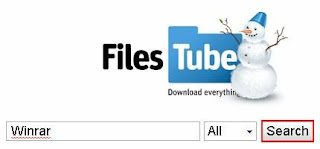
  • Enter the name of the file you want and Click on Search. (Here I am Inserting Winrar)

How to Search Files on Any File sharing Server
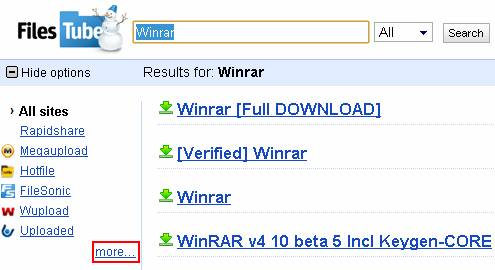
  • Now click on More button present at the left side.


How to Search Files on Any File sharing Server


  • Now all the Web Hosting Sites will be displayed. Now Select the Web Hosting Site in which you want to search that particular file.Here I have selected Mediafire.comSo, All the results will be displayed on Mediafire.


How to Search Files on Any File sharing Server


  • Click on the most appropriate link.

  • Now finally Click on Download.
  • Enjoy!!!

So, I hope you find my article useful!!!

continue reading

Thursday, December 29, 2011

Use Google As An Hacking Tool

Hii friends after my post on using windows 7/vista for one year without activation in all tech buzz here I am with an excellent trick to find out usernames and passwords of lakhs of users just by using google.


Undoubtedly google is the best search engine to search anything.In this post you will be using google to get access over users of facebook,hotmail,gmail etc.
Copy the below code and paste it in google search and see the results:
Program:     Url/Host:http://www.example.com     Login:        Password:  Computer:     Date:      Ip:

For example search this 
If u want passwords of users with yahoomail then search this
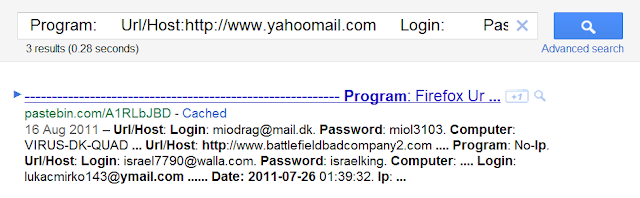
Program:     Url/Host:http://www.yahoomail.com     Login:       Password:  Computer:     Date:2011-07-26      Ip:
Result: 
keylogs 

You will get all the keylogs of many users ,for best results use recent keylogs(in this month) because most of them will be changed because they are already hacked logs.For best use date in this format 2011-12-15.


Using others accounts by hacking is not a good thing ,this is just for educational purpose.Hope that you liked this ,to keep in touch with my blog do subscribe.In my next post I will post more google tricks keep visiting,Thank you.


continue reading

Use Windows 7/Vista Without Activation For 1 Year

Hi friends here I am with a simple but powerful trick to make our windows 7/windows vista trial version into a full version without any keys,serials,patches etc which are mostly filled with viruses,trojans,spywares.
genuine-windows-7-beta-1-logo

Trick to convert trial version into full version for 120 days:


1.Go to Start->All programs->Accessories->Right click on command prompt and select "Run as Administrator"


2.Now type the below command(copy and paste it )
                                  slmgr -rearm
command

3.Now you will see a message to restart your computer.
When you restart the trial period will again set to 30 days ,you can do this for three times(i.e you can survive 120 days without activation).


After 3 trials are over then follow below trick


4.Now go to Start->Run->type regedit hit enter,now navigate to the following key


 HKEY_LOCAL_MACHINE\SOFTWARE\Microsoft\Windows NT\CurrentVersion\SoftwareProtectionPlatform


5.In right side coloumn change skiprearm to 1.
6.Now you will be able to use  slmgr -rearm command for another    
    8 times.
So total 120+240=360 days without activation and genuine version.


I hope you liked it,to keep in touch with my blog do subscribe. Thankz

continue reading