Thursday, December 29, 2011

Use Google As An Hacking Tool

Hii friends after my post on using windows 7/vista for one year without activation in all tech buzz here I am with an excellent trick to find out usernames and passwords of lakhs of users just by using google.



Undoubtedly google is the best search engine to search anything.In this post you will be using google to get access over users of facebook,hotmail,gmail etc.
Copy the below code and paste it in google search and see the results:
Program:     Url/Host:http://www.example.com     Login:        Password:  Computer:     Date:      Ip:

For example search this 
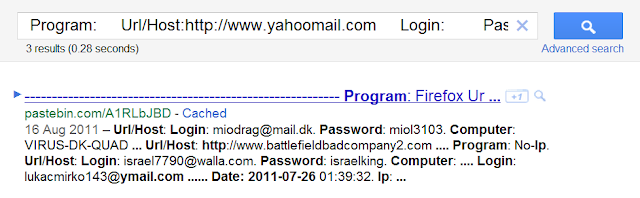
If u want passwords of users with yahoomail then search this
Program:     Url/Host:http://www.yahoomail.com     Login:       Password:  Computer:     Date:2011-07-26      Ip:
Result: 
keylogs 

You will get all the keylogs of many users ,for best results use recent keylogs(in this month) because most of them will be changed because they are already hacked logs.For best use date in this format 2011-12-15.


Using others accounts by hacking is not a good thing ,this is just for educational purpose.Hope that you liked this ,to keep in touch with my blog do subscribe.In my next post I will post more google tricks keep visiting,Thank you.



continue reading

Use Windows 7/Vista Without Activation For 1 Year

Hi friends here I am with a simple but powerful trick to make our windows 7/windows vista trial version into a full version without any keys,serials,patches etc which are mostly filled with viruses,trojans,spywares.
genuine-windows-7-beta-1-logo

Trick to convert trial version into full version for 120 days:


1.Go to Start->All programs->Accessories->Right click on command prompt and select "Run as Administrator"


2.Now type the below command(copy and paste it )
                                  slmgr -rearm
command

3.Now you will see a message to restart your computer.
When you restart the trial period will again set to 30 days ,you can do this for three times(i.e you can survive 120 days without activation).


After 3 trials are over then follow below trick


4.Now go to Start->Run->type regedit hit enter,now navigate to the following key


 HKEY_LOCAL_MACHINE\SOFTWARE\Microsoft\Windows NT\CurrentVersion\SoftwareProtectionPlatform


5.In right side coloumn change skiprearm to 1.
6.Now you will be able to use  slmgr -rearm command for another    
    8 times.
So total 120+240=360 days without activation and genuine version.


I hope you liked it,to keep in touch with my blog do subscribe. Thankz

continue reading

Monday, October 10, 2011

How to remove Password Lock from Memory card


This is most common issues that locked mobile phone memory card due to password lock. In most cases such SD cards will be be unusable without unlocking the card. To prevent your card from this issue, do not place password protection for memory card unnecessarily.


Most card readers will not show the card detected on PC because of this password lock. If you have very important data in the MMC card, try the following steps to remove protection from SD card.

We need an external file-manager software like FExplorer to work with. FExplorer is a file manager for Symbian phones with extra features for managing tasks, viewing processes and making screen captures. You can download FExplorer here.


STEPS:

Insert the micro SD card to your mobile phone and switch it ON.
Run FExplorer
Find the path C:\system.
Find the file mmcstore and copy it to your pc.
Open that file using notepad, the you will find the password in that text file.

    continue reading

    Sunday, October 9, 2011

    HARD FORMAT [USB Drive Using Command Prompt]


    In this post i am gonna  teach you how to format USB(Pendrive) by using command prompt.Here Command mode means terminal mode.Just follow the below steps to format your pendrive in seconds.
    How to format USB Drive?
    First goto command prompt like,
    Start ->Run -> Cmd .Hit enter button.
    Then command prompt will appears on the screen.By using format command you can format your PenDrive.
    Then type  format j:  /FS:FAT32 Here j is a drive letter.More information about format command in command prompt type help format.
    Then after the process is over now your drive is fresh, and ready to be written.Enjoy reading this article ,don’t forget to drop your comments.

    continue reading

    Wednesday, September 28, 2011

    How to Setup Facebook Timeline Feature

    Facebook Apps are really amazing FB Users and now it is  more than 52,000 applications available on Facebook Platform.Cityville,Farmville etc… are the some of the successfull 3rd party facebook apps.With rapid increase of FB Apps Facebook is also bringing some features like Facebook Smartlists etc..  as Posted before
    Now,I this post iam going to discuss with you about the procedures to setup the facebook timeline feature for your account

    Warning:- This Feature is  an unofficial loophole in Facebook’s system.so,Do it in your Own Risk and wishing you fun with facebook timeline
    • At First you have to open your Facebook page and point your mouse pointer towards the search option in the top
    • Search The Keyword “Developer”
     
    • Grant Permission to the Develop App to Acess your Private Information
    • Click Create a New App  and a pop-up box will open

    • Input App Display Name and an App Namespace.it doesn’t matter what you enter there
    • Enter the proper Captcha Code and you will proceed to a window and Click Open Graph on the Proceeded Window
    • You will Proceed to an another Window and Add like this “People Can Watch a Website“
    •  You will proceed to an another window,scroll down and click on “Save Changes and Next”.

    • Proceed to “save and continue” option also in the next window

    • After Saving,Go back to your  your Home Page and check for “Introducing TimeLine – a New Kind of Profile” and click on “Get It Now”
    • Now Timeline Feature For your Account is Acivated as like as this
    Warning:-  It doesn’t appear to be possible to roll back to the original profile pages after you’ve enabled the Timeline.
    If you have any doubts regarding the topic give us comments…..

    continue reading

    Tuesday, September 6, 2011

    Windows 7 Genuine Keys To Enjoy It More Than A Year

    Windows 7 Beta 64-bit Product Key

    7XRCQ-RPY28-YY9P8-R6HD8-84GH3
    RFFTV-J6K7W-MHBQJ-XYMMJ-Q8DCH
    482XP-6J9WR-4JXT3-VBPP6-FQF4M
    JYDV8-H8VXG-74RPT-6BJPB-X42V4
    D9RHV-JG8XC-C77H2-3YF6D-RYRJ9
    Windows 7 Beta 32-bit Product Key

    6JKV2-QPB8H-RQ893-FW7TM-PBJ73
    TQ32R-WFBDM-GFHD2-QGVMH-3P9GC
    GG4MQ-MGK72-HVXFW-KHCRF-KW6KY
    4HJRK-X6Q28-HWRFY-WDYHJ-K8HDH
    QXV7B-K78W2-QGPR6-9FWH9-KGMM7

    continue reading

    Rearrange System Tray Icons


    You can rearrange icons on the task bar as you wish and start new (or switch to running) instances of the first ten task bar programs using Win+1, Win+2, and so on. The cool thing is you can also rearrange system tray icons. Reorder them on the tray or move them outside or back in the tray. Take control of what you want to always keep an eye on, and from which apps you’ll require notifications.
     

    continue reading